
Aviamasters Demo Play Guide
Try Aviamasters with virtual FUN credits, no deposit or registration, and learn the controls before playing for real money.
The Aviamasters demo lets you test the interface and instant win mechanics without risking a cash balance. You can choose a FUN stake, launch a practice round, adjust the display and use Autoplay, but demo wins cannot be withdrawn and do not guarantee the same results with real money. The 97% RTP applies to real-money play, not as a promise for any individual round.
📑 Table of contents
- How to launch the Aviamasters demo
- What appears on the demo screen
- A demo round from start to finish
- Multipliers, events and Safe Landing
- Autoplay in the Aviamasters demo
- Demo settings on phone and computer
- Launch errors and quick fixes
- Demo play versus real-money play
- Responsible play, even in demo mode
- FAQ
How to launch the Aviamasters demo
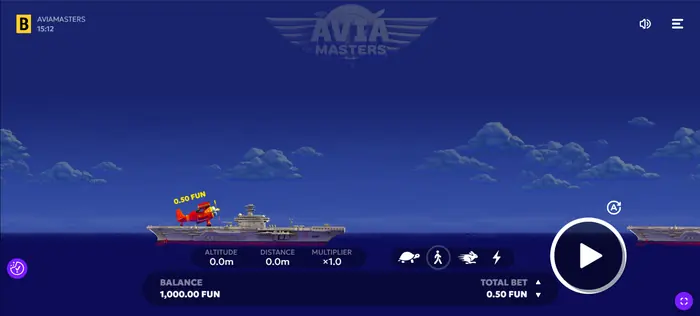
Open Aviamasters in a supported web browser and select the demo option when it is available. The game uses virtual FUN credits, so no deposit is needed to explore the controls. Choose a stake with the Bet buttons, then press Spin to send the aircraft into its test flight.
For a wider overview, visit Home.
Practice balance and FUN credits
FUN is a demonstration currency used to place practice stakes and display round results. It has no cash value, and any balance or win shown in the demo cannot be withdrawn. A practice result also cannot predict what will happen in a real-money round.
When you are ready to review the separate real-money conditions, see Real Money.
Starting without registration
In the usual browser flow, you can open the demo and start testing it without creating an account. An operator may still ask for regional or technical confirmation in some circumstances, depending on access rules, device checks or local requirements. Those checks do not turn FUN credits into withdrawable funds.
To compare other free options, browse Versions.
What appears on the demo screen
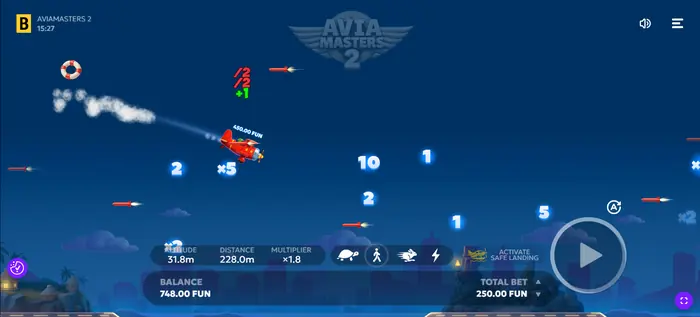
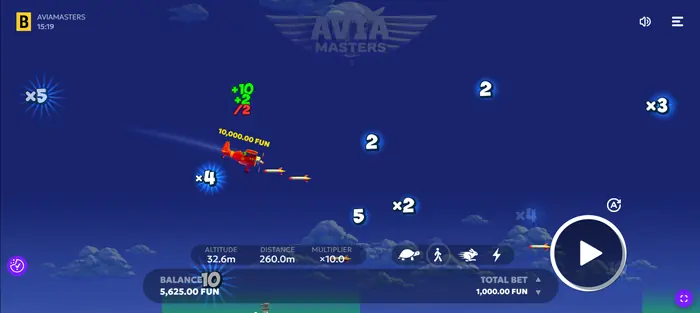
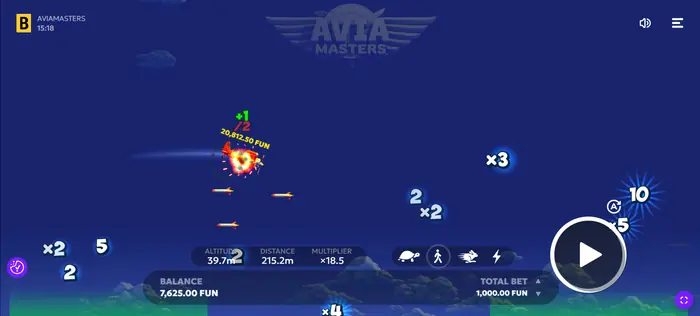
The main display brings several pieces of information together: the aircraft, Altitude, Distance and Multiplier, plus the FUN balance, Total bet, Spin, sound controls and the settings menu. Once you know where these items sit, a practice round is easy to follow without guessing what each change means.
Reading altitude, distance and multiplier
Altitude shows the aircraft's height, while Distance tracks how far the flight has progressed. The Multiplier starts at ×1.0 at the beginning of every round and changes when the aircraft encounters an event.
A rocket halves the current multiplier, a plain number adds to it, and a value marked with × multiplies it. If the aircraft lands on the ship rather than falling into the water, the final multiplier values are applied to the stake.
Balance, stake and last win
After a round, the virtual balance, selected stake and Last win display can change to reflect the demo calculation. These figures help you read the interface, but they are not a bank account, a cash ledger or proof of future profit.
The game rules also state that a result above the stake is rounded up to the nearest whole number, while a result below the stake is rounded down. That rule still applies only to the relevant game calculation.
A demo round from start to finish
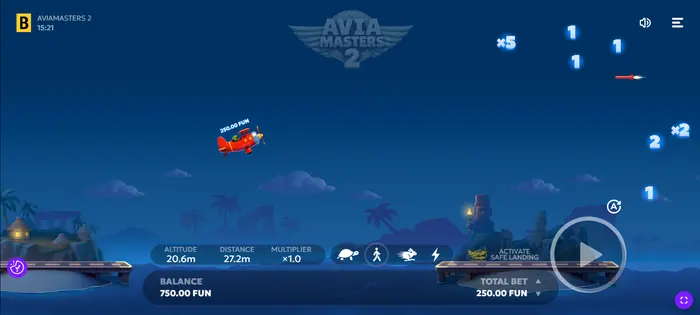
For a first test, select a small FUN stake, press Spin and watch the aircraft move. Let the round finish, then inspect the multiplier, the outcome and the updated practice balance. This short sequence shows how the controls work before you consider any real-money play, where the minimum bet is $0.10 and the maximum bet is $100.00.
Manual play and watching the flight
During manual play, keep an eye on the aircraft, the multiplier and any rockets or values that appear on the route. The visual sequence can make the round easier to follow, but it does not reveal a dependable pattern for the next result. Aviamasters uses a certified random number generator, so watching earlier flights cannot predict a later one.
Trying different stake sizes
You can test several FUN stake sizes to see how the interface updates its totals. Treat the exercise as a control check: note the selected stake and displayed result if that helps, but do not turn a short demo log into a claim of guaranteed profitability. A larger practice stake does not improve the odds of a particular random outcome.
Multipliers, events and Safe Landing
As the aircraft travels, the screen may show numbers, × multipliers or a rocket. These events change the current multiplier according to the game rules, while Safe Landing is a separate on-screen control or indicator described in the interface. Graphics and animations explain what is being displayed; they do not alter the randomness of the round.
The maximum win is 250x the stake. That is a game limit, not a promise that a round will reach it.
Positive and negative values
Green values generally mark additions to the current multiplier, while red values show a reduction or negative event. A plain number adds to the multiplier; a rocket halves it, and a value carrying the × sign multiplies it. Read these colours as event feedback, not as a signal that predicts the final result.
Using Safe Landing
Look for the Safe Landing control in the game interface and check the in-game rules before using it. If you open the rules during a round, the game pauses. The reference rules explain the named controls and outcomes more reliably than an assumption based on the animation alone.
Autoplay in the Aviamasters demo
Autoplay is a testing feature for running several demo rounds with less manual input. It is not a bot, a prediction tool or a winning strategy. Press Auto (A), choose the round setup and review the stop conditions before starting; press the same control again to stop Autoplay.
Choosing the number of automatic rounds
The demo offers preset Autoplay selections from 10 to 1000 rounds, along with an endless option and a custom round count where available. A shorter run is useful when checking a setting; a longer run only produces more observations and does not make the results predictable.
Setting stop conditions
In the Autoplay menu, you can stop after any win, after a single win exceeds a chosen value, when the balance rises by a chosen amount, or when it falls by a chosen amount. These conditions control when the sequence ends; they do not protect a real-money budget or change the random generator. Keep track of time as well, since automation can make a session feel shorter than it is.
Demo settings on phone and computer
| Feature | Phone or tablet | Computer |
|---|---|---|
| Control method | Touchscreen | Mouse |
| Full-screen mode | Available | Available |
| Music and sound effects | Adjustable | Adjustable |
| Spin button size | Adjustable | Adjustable |
| Spin button position and transparency | Adjustable | Adjustable |
Open the menu to change music and effects, resize or move Spin, and adjust its transparency. The flight speed has four settings, shown by the turtle, person, hare and lightning icons. The same menu also contains the rules and game history.
Launch errors and quick fixes
If the demo does not load, first refresh the page and check the internet connection. A frozen screen may clear after reopening the game; sound problems are often addressed by checking the in-game volume, device mute setting and browser permissions.
- Try a current supported browser if the game reports incompatibility.
- Clear the page or game session and reopen it if the demo state appears stuck.
- If progress disappears after a reset or reload, remember that demo progress is temporary and FUN credits have no cash value.
- Contact the operator's support team if the issue continues, especially where a technical failure affects a round.
Demo play versus real-money play
| Point of comparison | Demo | Real-money game |
|---|---|---|
| Currency | Virtual FUN credits | Cash balance |
| Withdrawals | Unavailable | Subject to operator rules |
| Account conditions | Usually no registration | Account and verification may be required |
| Limits and requirements | Demo access rules apply | Betting limits, age, region and legal requirements apply |
| Published RTP | Not a guaranteed demo result | 97% theoretical RTP for the game |
The real-money version is also subject to the game's stated limits, including bets from $0.10 to $100.00 and a maximum win of 250x the stake. Availability and withdrawal conditions depend on the operator and your jurisdiction.
Responsible play, even in demo mode
A demo is useful for learning the interface, not for proving a winning system or guaranteed income. You must be 18 or older to play for real money, and real-money access also depends on regional availability and the operator's checks.
If you move beyond practice, set a budget and session limit before depositing. Remember that the 97% RTP is a long-run theoretical figure, not a promise for one session or one player. Technical failures may void affected rounds and payouts under the game rules.
FAQ
Can I withdraw money from the Aviamasters demo?
No. Demo results remain in virtual FUN credits, which have no cash value and cannot be withdrawn.
What is Aviamasters' RTP?
The stated theoretical RTP is 97% for the game when played for real money. It does not guarantee the result of a demo round, spin or individual session.
How do I start Autoplay in the demo?
Press Auto (A), choose the number of rounds or another available mode, then set any Stop Conditions you want to use. Press Auto (A) again to stop it.
What should I do if the demo freezes or will not load?
Refresh the page, check your connection, try a current supported browser and review the device and in-game sound settings. If the problem remains, reopen the game or contact the operator's support team.